Why I Chose pgAdmin as a SQL Diagram Tool (ERD)
January 18, 2026 Reading time: 15 minutes
When I design a database schema, I always want a diagram (ERD).
It helps me see the system, understand relationships, and avoid mistakes early.
I tested several tools, and each one had strengths — but I ended up choosing pgAdmin because it matches how I work: visual first, direct PostgreSQL connection, no extra services.
Free ERD tools I tried (or considered):
dbdiagram.io (free tier, web-based)
Pros
- Very clean UI
- You write a small DSL (text schema), and it visualizes it
- Can export SQL
Cons
- Requires learning the DSL
- Free tier has diagram/project limits
Good if you like “schema as code” + clean visuals.
Diagrams.net (Draw.io) (free, offline or web)
Pros
- Fully free
- Great for planning and presenting diagrams
Cons
- Not a database tool
- No SQL export, no constraints, no validation
Good if you only need a visual plan and write SQL manually.
ERDPlus (free, web-based)
Pros
- Focused on ER diagrams
- Can generate SQL
- Great for simple designs and learning
Cons
- Basic interface
- Not many advanced features
Good if you want quick diagrams + SQL export for small projects.
DBeaver Community (free, desktop)
Pros
- Free and powerful DB client
- Can create ER diagrams from an existing schema
- Works with PostgreSQL, MySQL, and many others
Cons
- Diagrams are good, but not always “presentation perfect”
Good if you want a free alternative to DataGrip with ERD support.
MySQL Workbench (free, desktop)
Pros
- Classic tool for MySQL diagrams
- Supports reverse engineering from a live database
Cons
- Mostly MySQL-focused (not ideal if your main DB is PostgreSQL)
Oracle SQL Developer Data Modeler (free, desktop)
Pros
- Free graphical data modeling tool
- Supports logical + relational models and forward/reverse engineering
Cons
- Can feel heavy if you just want quick diagrams
Good if you want “serious” data modeling features for free.
pgModeler (open-source PostgreSQL modeler)
Pros
- Designed specifically for PostgreSQL
- Open-source and cross-platform
- Supports reverse engineering / visualization of existing databases
Cons
- More complex than simple tools
- Best for people who really want a full modeling workflow
pgAdmin
After trying multiple options, I stayed with pgAdmin because it gives me what I need without extra steps:
Pros
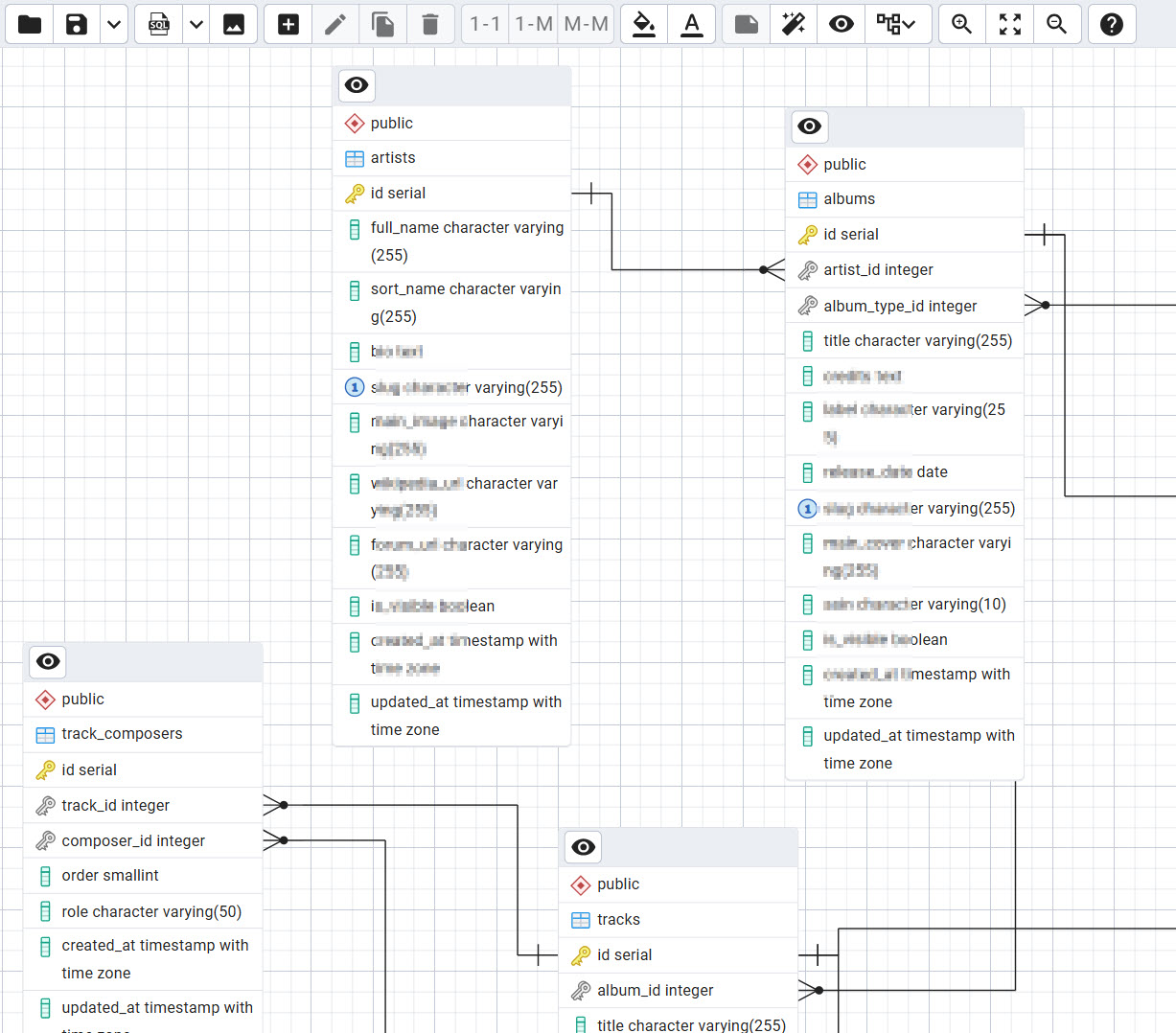
- Very visual and easy: I can quickly understand relationships like artists → albums → tracks
- Works directly with my PostgreSQL database (no importing/exporting)
- Auto-detects data types and relationships
- Good ERD export to print/share
Cons (but acceptable for me)
Sometimes I clean things up manually after schema work:
- remove NOT VALID when it’s not needed
- add missing CHECK constraints
- rename constraint names for consistency
For me this is fine, because I like having diagram + full SQL control.
Conclusion
There are many free diagram tools — and some are really good.
But if you want something that is:
- free
- visual
- connected to your real PostgreSQL schema
pgAdmin is a very practical choice.
Choosing Hosting for a Python + PostgreSQL Project in 2025:
November 29, 2025 Reading time: 11 minutes

What to Use and Why I Chose DigitalOcean
Hosting a Python project today isn’t as simple as buying a $3 shared hosting plan. If you’re running Django (or FastAPI) with PostgreSQL, you quickly run into the limits of traditional hosting. You need real CPU, real RAM, a place to run Gunicorn/Uvicorn, proper Nginx, storage for images, and ideally a way to scale if the project doesn’t die after two months.
When I started working on my next project — a music database built with Django + PostgreSQL — I honestly didn’t know what hosting I wanted. I only knew two things:
- I wanted it to be cheap, and
- it had to be scalable.
Here’s what I learned, which providers I considered, and why in the end I went with DigitalOcean.
1. What a Python + PostgreSQL project needs
Before we even talk about hosting, here’s the reality:
A Django app isn’t just “a website.” It’s a whole ecosystem that needs:
- Python 3
- Django
- PostgreSQL
- Gunicorn or Uvicorn
- Nginx (for serving and reverse proxy)
- SSL
- Static/media file handling
- Cron jobs or background tasks
- And SSH access to fix things when something breaks at 2am
This already eliminates classic shared hosting.
So I had to look at options where I control the server, or at least where Python apps are first-class citizens.
2. The main hosting options for Python apps
After some research (and a few mistakes), I realized there are basically three types of hosting that make sense.
A. VPS hosts (the “you get a server, now do everything yourself” option)
These include:
- DigitalOcean Droplets
- Hetzner Cloud
- Vultr
- Linode
- OVH
- IONOS Cloud
This is a real Linux machine in the cloud. You install everything yourself: Nginx, PostgreSQL, Python, etc.
Pros: cheap, powerful, and flexible.
Cons: you have to know what you’re doing.
B. Managed app platforms (the “I don’t want to be a system administrator” option)
Examples:
- DigitalOcean App Platform
- Render
- Railway
- PythonAnywhere
They run your Python app for you. You mostly click buttons.
Pros: super easy.
Cons: a bit pricey, and not as customizable.
C. Big cloud providers (the “maybe too much” option)
AWS, Google Cloud, Azure.
Pros: everything is possible.
Cons: complex, expensive, probably overkill for a personal project.
3. Other good hosting providers for Python + PostgreSQL
While people often discuss only DigitalOcean and Hetzner, I found several others worth mentioning:
- Vultr — similar to DO, often slightly cheaper
- Linode — solid performance, good for developers
- Render — great for easy deployments
- Railway — modern and simple
- PythonAnywhere — fantastic for beginners or small apps
- OVHcloud — cheap, but not as friendly
- IONOS — low prices, but UI feels outdated
Every provider has a personality. Hetzner feels “raw but powerful”, Render feels “friendly but pricey”, and AWS feels like “space shuttle control panel.”
4. Hetzner vs DigitalOcean (the two most serious contenders)
In the end, my shortlist was just these two. They both are very good, but they have very different philosophies.
Hetzner Cloud
What I liked:
- Insanely cheap (seriously)
- Fast NVMe servers
- Great CPU/RAM for the price
What I didn’t like:
- Data centers mostly in Europe
- No managed PostgreSQL
- You have to configure everything yourself
- Backups and snapshots need more manual setup
Hetzner feels like buying car parts and building the whole car yourself. Amazing if you enjoy that.
DigitalOcean
What I liked:
- Very clean UI
- Tons of documentation
- Many global regions
- Managed PostgreSQL available
- Spaces for media storage
- Snapshots, backups, and firewalls are simple
- Feels stable and predictable
What I didn’t like:
- More expensive than Hetzner
- Not the absolute fastest per dollar
DigitalOcean feels like buying a ready-to-drive car. You can still open the hood, but you don’t have to build the engine.
5. The big question: what do I actually need?
My project is not a small blog.
It has:
- lots of database tables
- media files (album covers, artist images)
- potential for many users
- admin interface
- APIs
- and probably more features in the future
So I needed hosting that is:
- reliable
- not too expensive
- easy to maintain
- flexible
I didn’t want to spend half my time configuring servers instead of building my project.
6. So why did I choose DigitalOcean?
Honestly, here is the simple explanation:
DigitalOcean gives the best balance.
Not the cheapest.
Not the most powerful.
But the overall experience is smooth and predictable.
I don’t want to fight with servers every week.
Hetzner requires more hands-on maintenance.
With DO, things “just work” most of the time.
Managed PostgreSQL is a big deal.
Maybe I won’t need it right now.
But for the future, it’s nice to have the option without moving the whole project somewhere else.
Spaces for images/media.
Perfect for album covers, artist photos, and all the other media my project will eventually need.
DO has great documentation.
Everything I search — "Django deploy", "Gunicorn", "Nginx", "PostgreSQL backups", “Django + Spaces” — they have step-by-step guides.
Simpler scaling.
If I need more RAM or CPU, I click “resize.”
Done.
Peace of mind.
After trying different providers, I realized I prefer paying a few dollars more for a service that feels stable and comfortable.
7. Final thoughts
Every hosting provider shines in different situations:
- Hetzner — best if you want maximum power for minimum money
- Vultr / Linode — good alternatives to DigitalOcean
- Render / Railway / PythonAnywhere — good if you don’t want to touch servers
- AWS / GCP — good for huge, complex projects
- DigitalOcean — the sweet spot for price, simplicity, documentation, and future growth
For what I’m building — a Django + PostgreSQL project that needs to be affordable, performant, and not too complicated to manage — DigitalOcean was the right choice.
Not perfect.
Not the cheapest.
Not the absolute fastest.
Just balanced, and for me, that’s exactly what I want.